Deskivo home
Features

One platform for IT service, assets and stock

Support, devices, spares and purchasing in one place, so your team spends less time switching tools and more time fixing things. Everything here works today unless it's marked "coming soon".

Deskivo modules

Deskivo Service

Service desk

Tickets from email, the self-service portal or your team, with SLAs, automations, approvals, canned replies and satisfaction scores.

Deskivo Assets

Asset register and loans

Every device in one register, with QR labels, check-out with e-signatures, loaner carts and overdue reminders.

Deskivo Stock

Stock and consumables

Track toner, cables and spares by site, with stock movements and reorder alerts before you run out.

Deskivo Purchasing

Purchase orders and suppliers

Raise purchase orders against stock, route them for approval and keep supplier details in one place.

Deskivo Knowledge

Self-service and runbooks

Articles for staff self-service on the portal, plus internal runbooks for your technicians.

Deskivo Insights

Dashboards and reports

Live dashboards, ticket and asset reports with CSV export, and cross-site reporting on higher packages.

Deskivo Portal

Self-service portal

A branded help centre where people raise and follow requests, see their devices and loans, and find answers.

Deskivo Projects Projects: coming soon

Change requests today, projects next

Change requests with risk, approval, implementation and back-out plans are available now. Full project planning is coming soon.
Deskivo Service

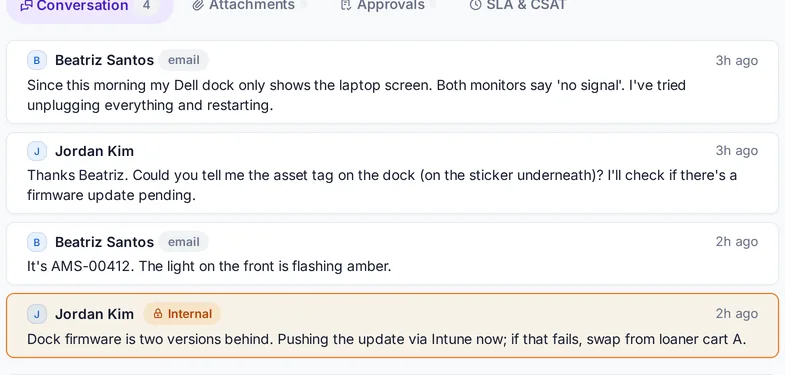
A service desk your team will actually like

  • Tickets from email, the self-service portal or your team
  • Priorities with SLA response and resolution targets
  • Categories, automations and approval steps
  • Canned responses and internal notes
  • Confidential ticket types for sensitive issues
  • Satisfaction scores after resolution
  • Command palette (Ctrl K) to jump anywhere
A Deskivo ticket with conversation and SLA status
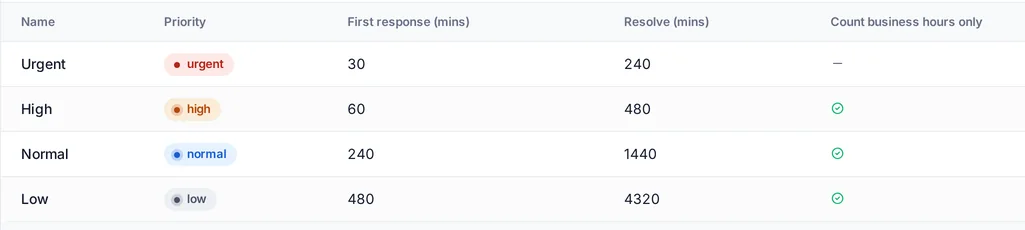
SLAs and business hours

Targets that fit your working week

  • Response and resolution targets per priority
  • Choose 24Γ—7 or business-hours clocks for each priority
  • Opening hours and time zone per organisation or site
  • Holidays and closure days pause the clock
  • SLA status on every ticket and in the ticket list
Deskivo SLA policies per priority with business-hours settings
Deskivo Service

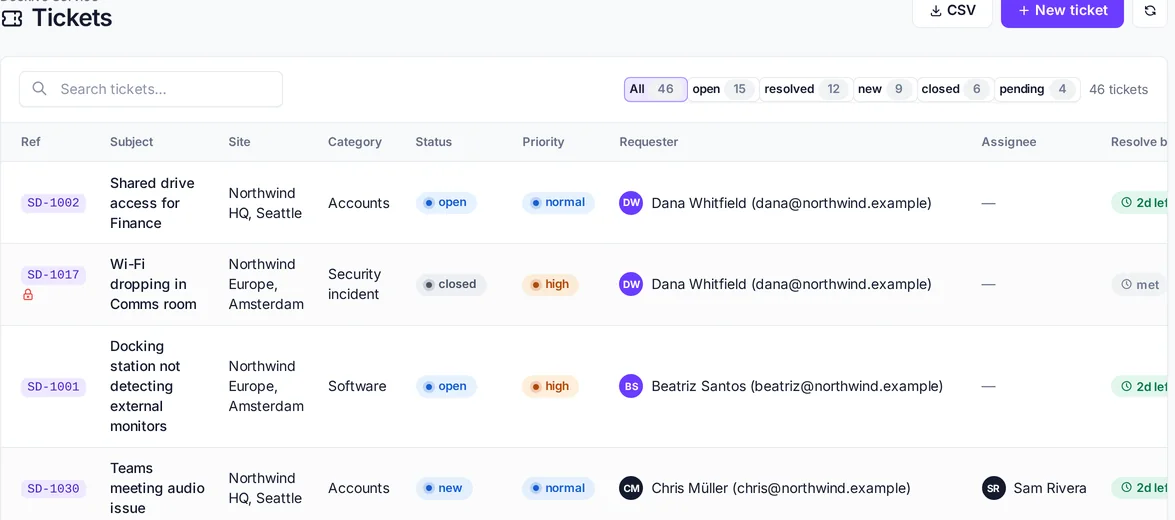
Your whole queue at a glance

  • Filter by status and search across every ticket
  • Time left on each SLA, right in the list
  • CSV export for reporting
Deskivo ticket list with statuses, priorities and SLA time left
Deskivo Assets

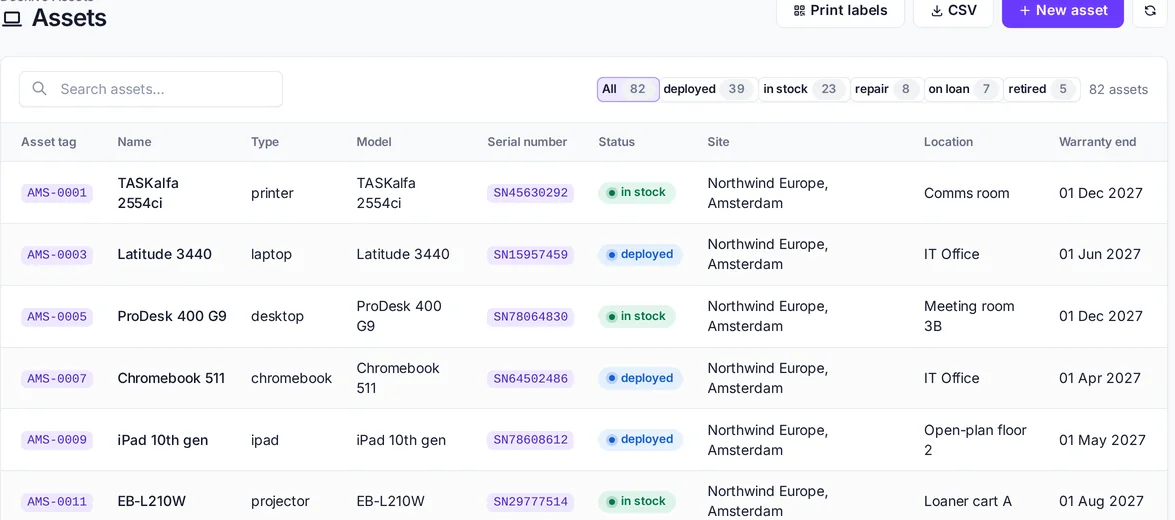
Every device, accounted for

  • Asset register with custom fields and QR labels
  • Warranty dates, locations and full history
  • Intune device sync (Standard and above)
Deskivo asset register with serial numbers, status, site and warranty
Check-out and check-in

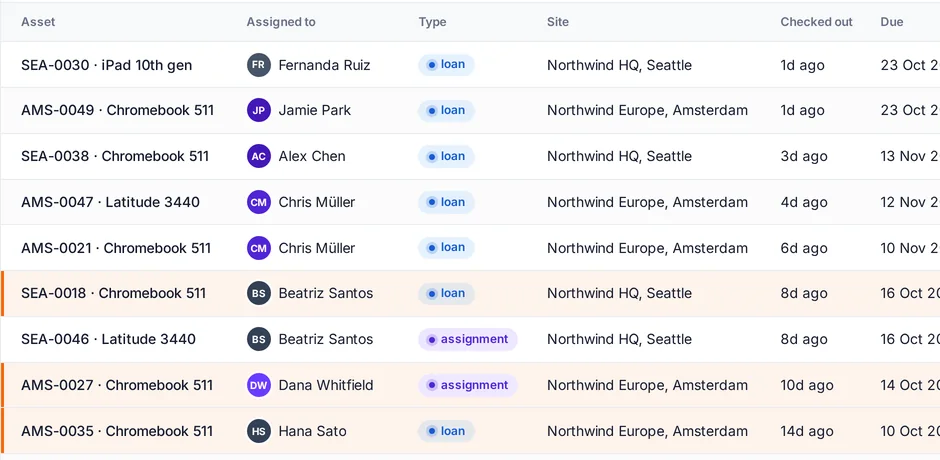
Loans that work in practice

  • Check-out and check-in with e-signatures and condition notes
  • Loaner carts and bulk loans
  • Due dates, overdue tracking and reminders
Deskivo check-out list with due dates and overdue loans
Deskivo Stock and Deskivo Purchasing

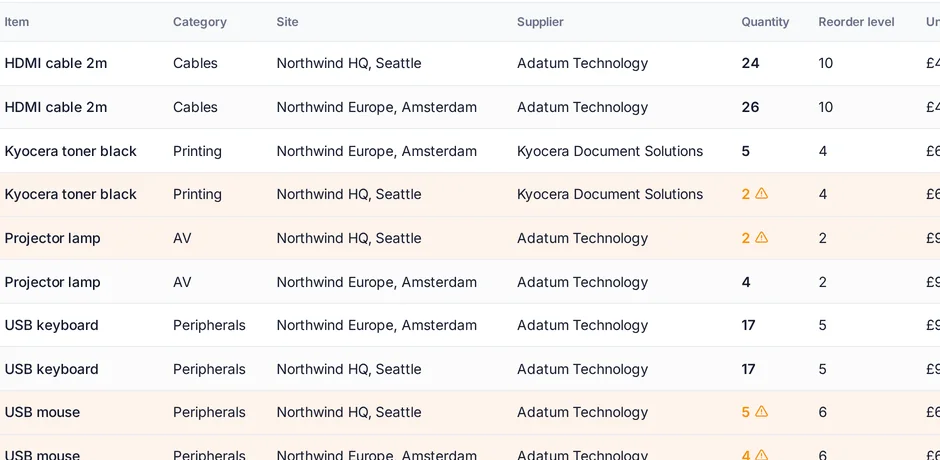
Spares and orders without the spreadsheet

  • Stock lines per site and location
  • Movements with a running balance
  • Reorder levels and low-stock alerts
  • Purchase orders with approval, and suppliers
Deskivo stock list with reorder levels
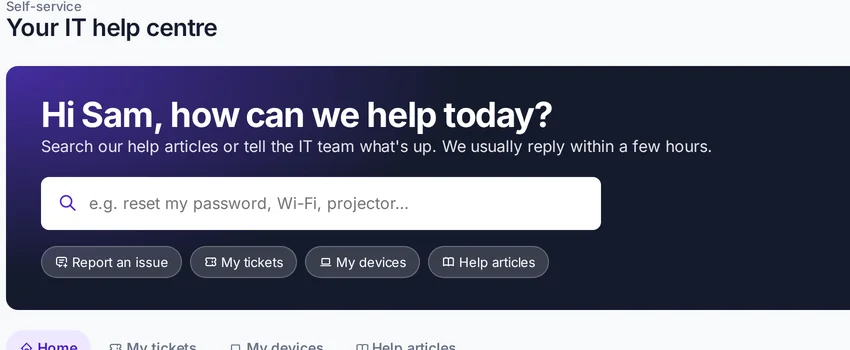
Self-service portal

A help centre your people will use

  • Raise and follow requests from a clean portal
  • See their own devices and loans
  • Search help articles before raising a ticket
  • Your logo and colours (by package)
The Deskivo self-service portal with search, recent tickets and help articles
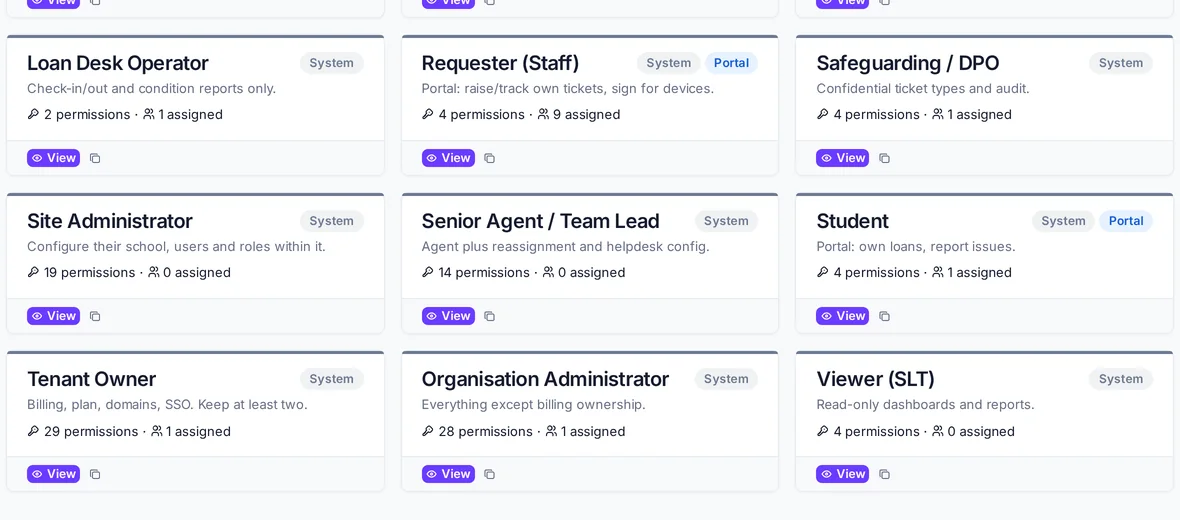
Roles and permissions

Everyone sees exactly what they should

  • Built-in roles for technicians, asset managers, finance and more
  • Permissions scoped to each site
  • Custom roles (Standard and above)
Deskivo roles and access with built-in roles and permission counts
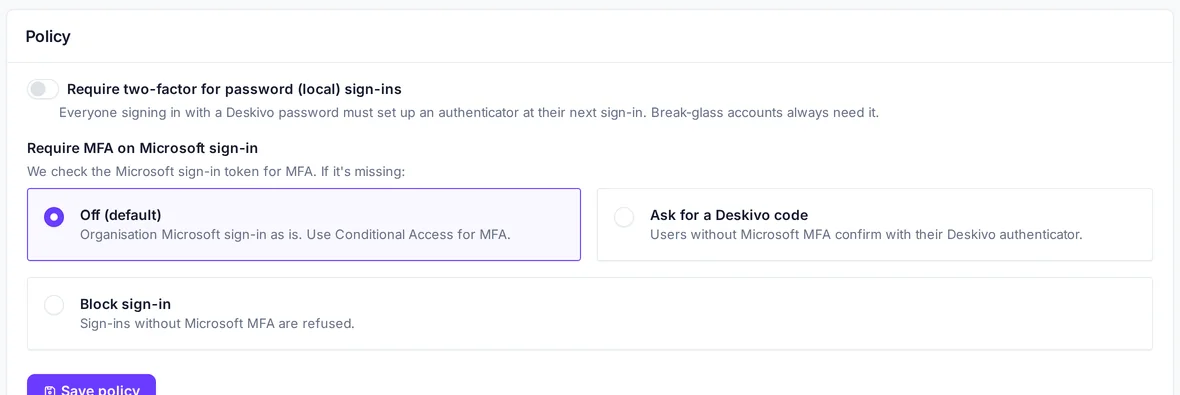
Sign-in security

SSO and two-factor, built in

  • Microsoft Entra ID single sign-on
  • Authenticator-app two-factor with backup codes
  • Require two-factor for everyone
  • Optionally require MFA on Microsoft sign-in
Deskivo sign-in security settings for two-factor and Microsoft MFA
Dark mode

Easy on the eyes

Every screen works in light and dark mode, and Deskivo remembers your choice.
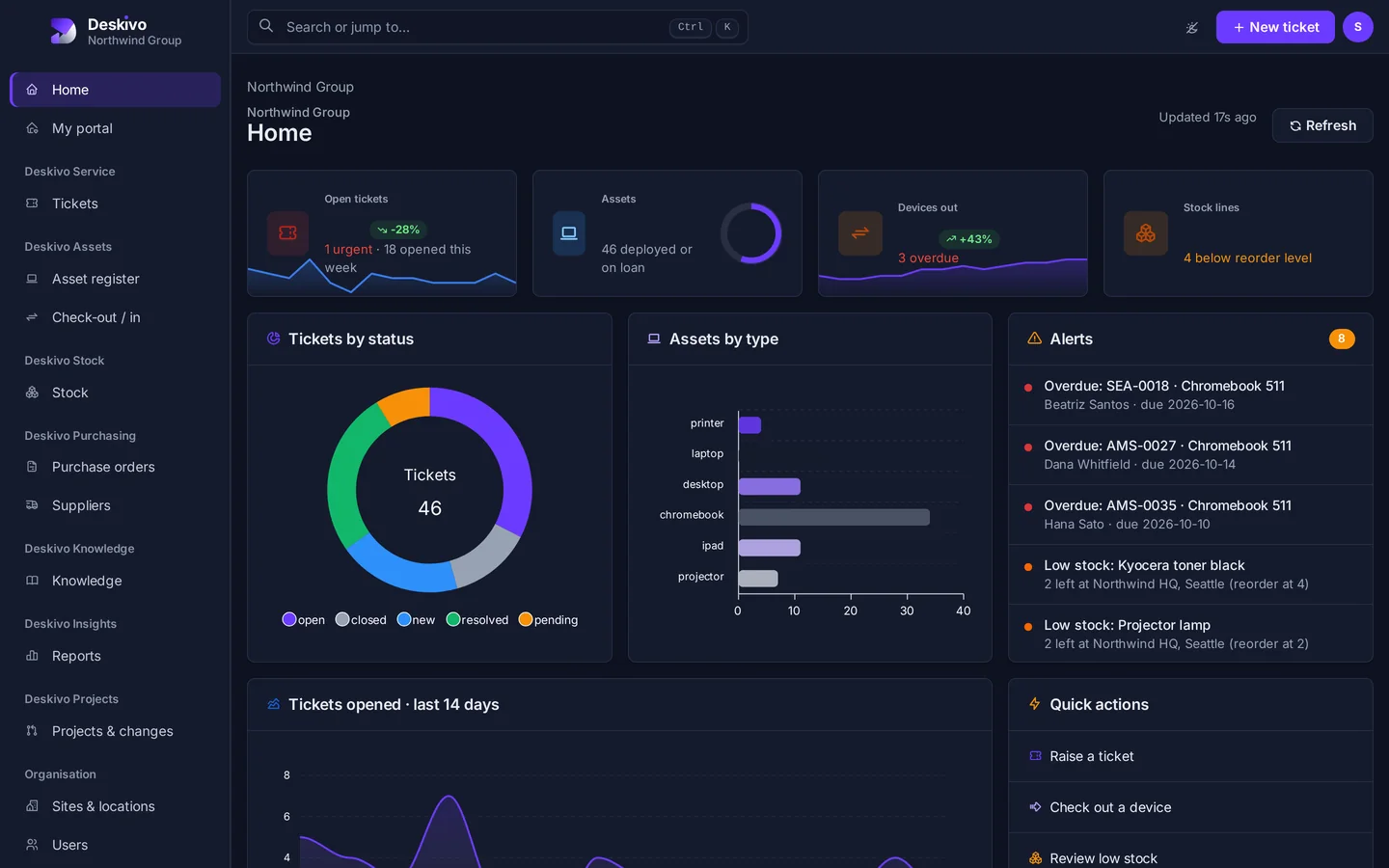
Deskivo dashboard in dark mode
Platform

Platform and administration

Single sign-on

Microsoft Entra ID sign-in, accounts created on first sign-in, Entra groups mapped to roles and user sync from Microsoft Graph.

Two-factor authentication

Authenticator-app codes with backup codes for password sign-in, and owners can require it for everyone.

Multi-tenant

Each organisation gets its own isolated workspace at yourname.deskivo.cloud, with sites, locations and roles scoped per site.

Custom domains

Use it.yourcompany.com, with HTTPS certificates issued and renewed automatically (Standard and above).

Branding

Your logo from Starter, full branding from Standard, and per-site branding with your own colours on Enterprise.

Email your way

Send through the Deskivo relay, your own Microsoft 365 or your own SMTP server. Inbound email becomes tickets.

API and webhooks

A REST API with tokens, plus signed webhooks (write access on Standard and above).

Help from Deskivo

Raise tickets with our Support, Billing or Customer Service teams from your own admin area and follow them there.

Public status page

Live service status, incidents and maintenance at status.deskivo.cloud, with email updates.

Be first in when we open.

Join the Deskivo UK launch list. Your data is hosted on servers based in the UK.